English
Custom Codec
RedisME supports custom serialization/deserialization via external scripts, so you can view and edit non–UTF-8 or application-specific payloads.
Wire vs display
- STRING / Hash / List / Set / ZSet: IPC is always Base64 wire; the codec dropdown only controls display and does not re-fetch from Redis when changed.
- Stream / JSON: codec dropdown stays disabled.
Built-in JavaSerial / Pickle / PhpSerial:
STRING: choose JavaSerial / Pickle / PhpSerial in the codec dropdown (or Auto).
Hash / List / Set / ZSet: open the field editor; magic bytes auto-select when possible.
JavaSerial: View JDK-serialized bytes as plain text (top-level
String) or JSON (other objects). Same approach as RedisInsight (java-object-serialization), with extras forjava.time, records, common collections, etc.Pickle: View Python
picklebytes (protocols 0–5) as plain text (top-levelstr) or JSON; common dict/list/set/bytes and objects with$class/$typeare supported.PhpSerial: View PHP
serialize()payloads as plain text (top-levelstring) or JSON; arrays, nested structures andO:class instances (shown with a$classname) are supported. Same library as Another Redis Desktop Manager (php-serialize). References (R:/r:) are not supported yet.All are view-only. To write back, use the custom scripts below with a local
java/python/php.
Entry and setup
- Open the value detail view
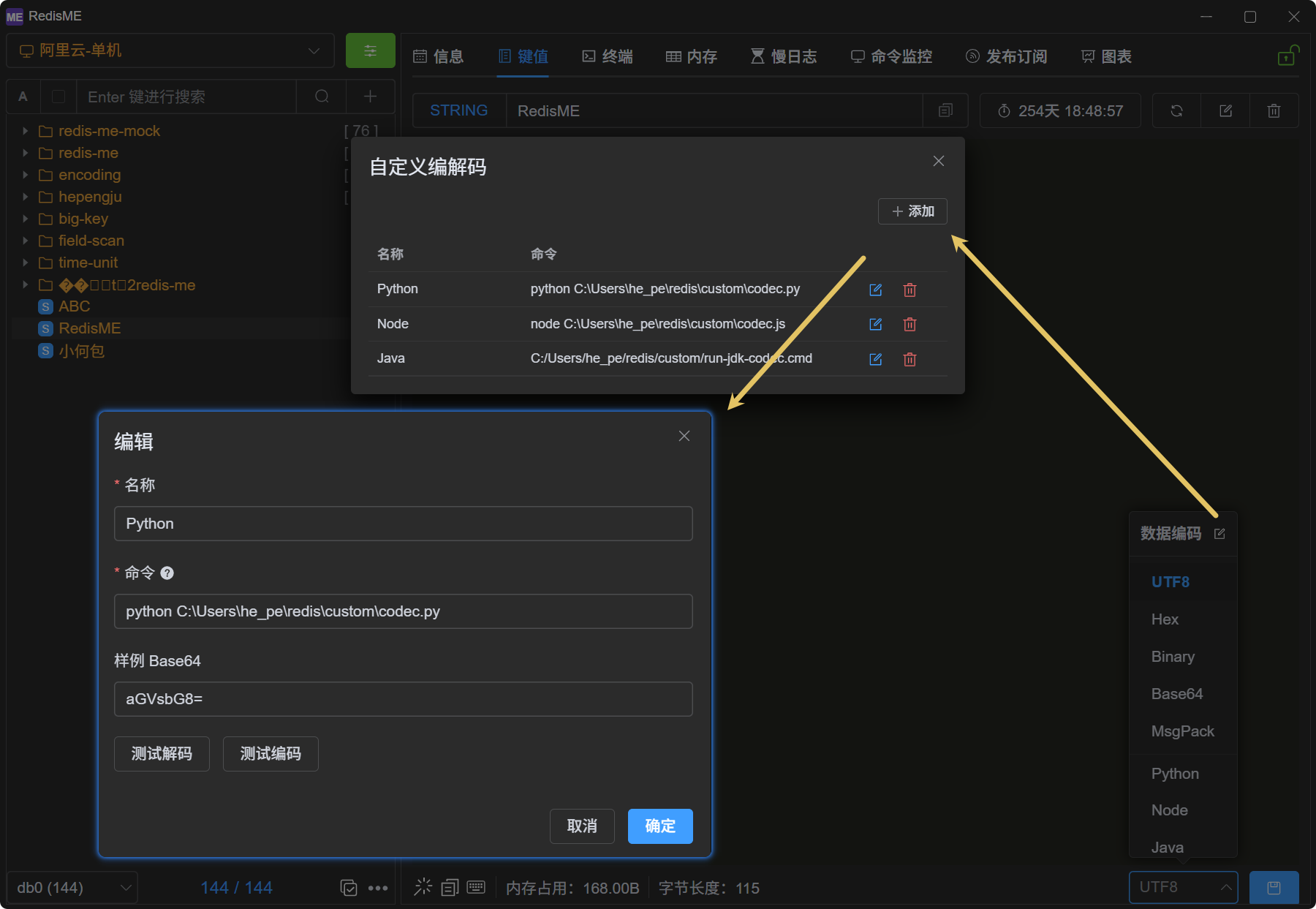
- Click the edit icon in the codec dropdown header to open the Custom Codec dialog
- Add an entry (either way):
- From Template: pick Python / Node / Java, export the script to disk, then name and command are filled in
- Add: enter name and command manually
- Fields:
- Name — shown under the Custom group in the dropdown
- Command — full executable command including the interpreter (see below)
Built-in templates already split out decode / encode; leave the protocol boilerplate alone and put your logic in those two methods (Hex sample by default).
Script protocol
The app appends two arguments after your command:
bash
# Read: Redis raw bytes (wire base64) → editor text
{command} decode {wire_base64}

# Write: editor text → Redis raw bytes (wire base64)
{command} encode {editor_text_utf8_base64}

# When Base64 exceeds 8000 chars (avoids Windows command-line limits)
{command} decode --stdin    # read one line of Base64 from stdin
{command} encode --stdin| Direction | Arg 1 | Arg 2 | stdout |
|---|---|---|---|
| decode | decode | Base64 of raw Redis bytes | UTF-8 text (shown in the editor) |
| encode | encode | Base64 of editor text as UTF-8 bytes | Single line Base64 of raw Redis bytes |
| large payload | same | --stdin (one line of Base64 from stdin) | same |
Notes:
- Arg 2 is a single-line standard Base64 string (no spaces); over 8000 chars it becomes
--stdin— read one line from stdin (readlineor equivalent) - Small payloads still use
sys.argv[2](Python),args[1](Java), orprocess.argv[3](Node) - On decode success, stdout is editable text; on encode success, stdout is a single Base64 line
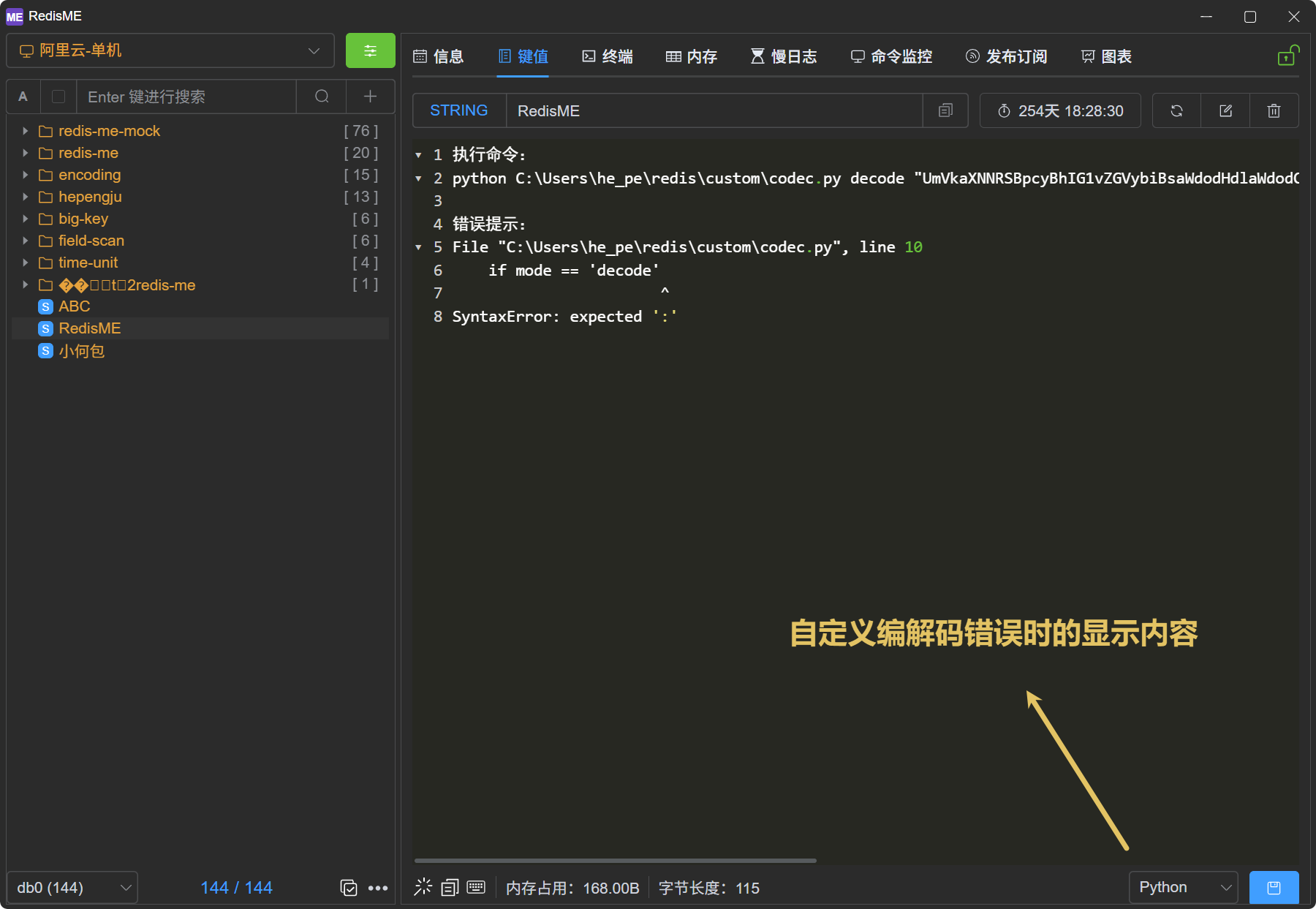
- On failure, write to stderr and use a non-zero exit code; the app shows the full executed command in the error message
- Base64 in arg 2 is the wire format between the app and your script — not necessarily what you show in the editor (see the Hex sample below)
Command examples
python C:\path\to\codec.py
node /path/to/codec.js
java C:\path\to\Codec.java
stdout encoding
The app reads stdout as UTF-8. On Windows, Python scripts should call sys.stdout.reconfigure(encoding='utf-8') (see samples below).
Workflow
- Configure and save your custom codec entry
- Select it from the Custom group in the codec dropdown
- The value area shows decoded text; edit and click Save
- Use Test Decode / Test Encode in the dialog to verify your script:
- Default wire Base64 sample is
aGVsbG8=(byteshello) - With the Hex samples below: Test Decode should show
68656c6c6f; for Test Encode, use editor sample68656c6c6f(UTF-8 text) and expectaGVsbG8=
- Default wire Base64 sample is
Scope and limits
- Default execution timeout is 5 seconds
- Base64 ≤ 8000 chars uses the command line; above that the app uses
--stdinautomatically (scripts must support it; see samples)
Sample: Python (Hex view/edit for binary)
Same as From Template → Python in the app. Raw Redis bytes are shown as lowercase hex in the editor; on save, hex is parsed back to bytes. For your own format, only change decode / encode.
python
#!/usr/bin/env python3
"""
RedisME custom codec template
Leave the protocol boilerplate alone; only change decode / encode below.
"""
import sys
import base64
import binascii

# ---------------------------------------------------------------------------
# TODO: implement your codec (Hex sample below — use as-is or replace)
# ---------------------------------------------------------------------------

def decode(raw: bytes) -> str:
    """Redis raw bytes → editor text."""
    return binascii.hexlify(raw).decode('ascii')  # sample: lowercase hex


def encode(text: str) -> bytes:
    """Editor text → Redis raw bytes."""
    return binascii.unhexlify(text.strip())  # sample: parse hex


# ---------------------------------------------------------------------------
# Protocol boilerplate — usually leave as-is
# ---------------------------------------------------------------------------

def main() -> None:
    # Windows pipes may default to GBK; RedisME reads stdout as UTF-8
    if hasattr(sys.stdout, 'reconfigure'):
        sys.stdout.reconfigure(encoding='utf-8')
        sys.stderr.reconfigure(encoding='utf-8')

    if len(sys.argv) < 3:
        sys.exit('usage: codec.py <decode|encode> <base64|--stdin>')

    mode, arg = sys.argv[1], sys.argv[2]
    b64 = sys.stdin.readline().strip() if arg == '--stdin' else arg
    raw = base64.b64decode(b64)

    try:
        if mode == 'decode':
            sys.stdout.write(decode(raw))
        elif mode == 'encode':
            sys.stdout.write(base64.b64encode(encode(raw.decode('utf-8'))).decode('ascii'))
        else:
            raise ValueError(f'unknown mode: {mode}')
    except Exception as e:
        print(e, file=sys.stderr)
        sys.exit(1)


if __name__ == '__main__':
    main()
Command example:
C:\path\to\python.exe C:\path\to\codec.pySample: Node.js (Hex view/edit for binary)
Same as From Template → Node in the app.
javascript
#!/usr/bin/env node
/**
 * RedisME custom codec template
 * Leave the protocol boilerplate alone; only change decode / encode below.
 */

// ---------------------------------------------------------------------------
// TODO: implement your codec (Hex sample below — use as-is or replace)
// ---------------------------------------------------------------------------

/** Redis raw bytes → editor text */
function decode(raw) {
  return raw.toString('hex') // sample: lowercase hex
}

/** Editor text → Redis raw bytes */
function encode(text) {
  return Buffer.from(text.trim(), 'hex') // sample: parse hex
}

// ---------------------------------------------------------------------------
// Protocol boilerplate — usually leave as-is
// ---------------------------------------------------------------------------

const mode = process.argv[2]
const arg = process.argv[3]

async function readB64() {
  if (arg !== '--stdin') {
    if (!mode || !arg) throw new Error('usage: codec.js <decode|encode> <base64|--stdin>')
    return arg
  }
  // App writes one line and does not close stdin — return on first newline (do not wait for EOF)
  let data = ''
  for await (const chunk of process.stdin) {
    data += chunk
    const nl = data.search(/\r?\n/)
    if (nl >= 0) return data.slice(0, nl).trim()
  }
  return data.trim()
}

async function main() {
  const raw = Buffer.from(await readB64(), 'base64')
  if (mode === 'decode') {
    process.stdout.write(decode(raw))
  } else if (mode === 'encode') {
    process.stdout.write(encode(raw.toString('utf8')).toString('base64'))
  } else {
    throw new Error(`unknown mode: ${mode}`)
  }
}

main()
  .then(() => process.exit(0)) // app does not close stdin after write; exit explicitly
  .catch(e => {
    process.stderr.write(String(e) + '\n')
    process.exit(1)
  })
Command example:
node C:\path\to\codec.jsSample: Java (Hex view/edit for binary)
Same as From Template → Java in the app. Requires JDK 11+; run the single source file directly (no javac). Class and file names are Codec / Codec.java.
java
import java.nio.charset.StandardCharsets;
import java.util.Base64;
import java.util.Scanner;

/**
 * RedisME custom codec template (JDK 11+: java Codec.java)
 * File must be named Codec.java; leave the protocol boilerplate alone,
 * only change decode / encode below.
 */
public class Codec {

    // -----------------------------------------------------------------------
    // TODO: implement your codec (Hex sample below — use as-is or replace)
    // -----------------------------------------------------------------------

    /** Redis raw bytes → editor text */
    private static String decode(byte[] raw) {
        return toHex(raw); // sample: lowercase hex
    }

    /** Editor text → Redis raw bytes */
    private static byte[] encode(String text) {
        return fromHex(text.trim()); // sample: parse hex
    }

    private static String toHex(byte[] bytes) {
        StringBuilder sb = new StringBuilder(bytes.length * 2);
        for (byte b : bytes) sb.append(String.format("%02x", b));
        return sb.toString();
    }

    private static byte[] fromHex(String hex) {
        if (hex.length() % 2 != 0) throw new IllegalArgumentException("invalid hex length");
        byte[] out = new byte[hex.length() / 2];
        for (int i = 0; i < hex.length(); i += 2) {
            int hi = Character.digit(hex.charAt(i), 16);
            int lo = Character.digit(hex.charAt(i + 1), 16);
            if (hi < 0 || lo < 0) throw new IllegalArgumentException("invalid hex character");
            out[i / 2] = (byte) ((hi << 4) + lo);
        }
        return out;
    }

    // -----------------------------------------------------------------------
    // Protocol boilerplate — usually leave as-is
    // -----------------------------------------------------------------------

    public static void main(String[] args) {
        if (args.length < 2) {
            System.err.println("usage: Codec <decode|encode> <base64|--stdin>");
            System.exit(1);
        }
        String mode = args[0];
        String b64 = "--stdin".equals(args[1])
            ? new Scanner(System.in).nextLine().trim()
            : args[1];
        try {
            byte[] raw = Base64.getDecoder().decode(b64);
            if ("decode".equals(mode)) {
                System.out.print(decode(raw));
            } else if ("encode".equals(mode)) {
                System.out.print(Base64.getEncoder().encodeToString(
                    encode(new String(raw, StandardCharsets.UTF_8))));
            } else {
                throw new IllegalArgumentException("unknown mode: " + mode);
            }
        } catch (Exception e) {
            System.err.println(e.getMessage());
            System.exit(1);
        }
    }
}
Command example (use the absolute path to the source file — do not use java Codec.java; if the working directory is wrong, the JVM may print GBK errors to stdout and the app reports invalid utf-8 sequence):
java C:\Users\he_pe\redis\custom\Codec.javaIf java is not on PATH, use the full JDK path, for example:
"C:\Program Files\Java\jdk-21\bin\java.exe" C:\Users\he_pe\redis\custom\Codec.javaTroubleshooting
| Symptom | Likely cause |
|---|---|
invalid utf-8 sequence | Script stdout is not UTF-8 (e.g. Chinese output on Windows); for Java: often a relative Codec.java path — file not found, JVM prints GBK to stdout |
| python / java not found | Interpreter not on PATH — use the full path |
| Empty decode | Script did not write to stdout on decode, or exit code is non-zero |
| encode hex errors | Editor text has non-hex characters or odd length |
The error message includes the executed command line for copy/paste into a terminal.